
Today's business world is all about keeping customers happy and coming back. One of the best ways to do this is by using a Customer Relationship Management system, or CRM. A good CRM tool helps you manage customer information, track their needs, and build lasting relationships. In this guide, we will show you how CRM relationship management works and why it matters for your business growth.
Key Takeaways
- A CRM system stores all customer information in one place. You can see their purchase history, communication preferences, and what they like to buy.
- When you use CRM customer management, your whole team stays on the same page. Everyone knows what was discussed with each customer.
- CRM systems can do routine tasks automatically. Sending follow-up emails, reminding customers about special offers, and scheduling appointments happen without manual work.
- With a good CRM, you get reports and insights about customer behavior. You can see patterns in what they buy, when they buy, and how often they return.
- A CRM lets you reward loyal customers, remember important dates, and personalize every interaction.
- CRM systems help sales teams prioritize leads, track deals, and follow up faster.
What is CRM Relationship Management?
CRM stands for Customer Relationship Management. It is not just software. It is a strategy for how you treat every person who buys from you or might buy from you in the future. A CRM relationship management system helps you organize, track, and improve all your customer interactions.
The main goal of CRM relationship management is simple. Keep your customers happy. When customers are happy, they buy more. They buy more often. They tell their friends. And they do not get angry or leave for a competitor.
Why Does CRM Relationship Management Matter?
In the old days, a business owner might have known their customers personally. They would remember that Mrs. Johnson likes coffee but not sugar. They would know that Tom always orders on Tuesdays. They would remember to ask about people's families and pets.
But today, most companies have hundreds or thousands of customers. Your sales team cannot remember all these details on their own. That is where CRM relationship management comes in. It remembers everything. It reminds your team. It makes sure no customer falls through the cracks.
Understanding CRM Customer Management
CRM customer management is about managing your relationships with the people who buy from you. It covers everything from the first time someone shows interest in your product, all the way to after they buy.
A good CRM customer management system does four main things:
Collects Customer Information: Every time a customer talks to you, buys from you, or even visits your website, that information gets saved. Their name, email, phone number, what they bought, when they bought it, and any notes from your team all go into the system.
Organizes All Info: Instead of having information scattered across emails, notebooks, and people's heads, a CRM puts it all in one organized place. You can search for any customer and see their full history in seconds.
Helps Your Team Work Together: When your sales team, support team, and marketing team all use the same CRM, they see the same information. If a customer calls your support team, the rep can see what they bought and what they have been talking about. No one must ask the customer to repeat information.
Creates Automatic Workflows: A CRM can be set up to automate tasks. When a customer buys something, an email automatically gets sent saying thank you. When a customer has not ordered in three months, an automatic reminder can go out. This keeps your business running smoothly without people having to remember everything.
How CRM Helps You Keep Customers
Building Stronger Customer Relationships
When you know your customers well, you can treat them better. You can remember their preferences. You can anticipate what they need before they even ask. This makes customers feel special.
Tracking Every Customer Interaction
Every phone call, Every email, Every purchase, or Every support ticket. All of this goes into your CRM. Your team can see the entire story of your relationship with each customer.
- What problems has the customer had
- How quickly you fixed those problems
- How satisfied they seem with your service
- What they have bought and what they have NOT bought
- When they might be ready to buy again
Making Customers Feel Valued
When a customer calls your business, do they have to explain who they are or what they bought? Do they have to repeat the information they already told someone else? That is frustrating.
With a good CRM, the person who answers the phone can see everything. They know exactly who is calling before they even pick up the phone. They know the customer's history. They know what they are probably calling about. This makes the customer feel like a real person, not just a number.
The Benefits of Using CRM for Customer Retention
Benefit 1: You Remember What Matters
Humans forget things. But your CRM does not. It remembers every order, every question, and every problem. It remembers when to reach out. It remembers important dates like birthdays or anniversaries.
When you send a customer a birthday discount or remember an important date, that customer feels special. That feeling keeps them coming back.
Benefit 2: You Serve Customers Faster
When you know everything about a customer, you can help them faster. Your team does not waste time looking for information. They do not ask the customer questions that the customer has already answered.
Fast, smooth service keeps customers happy. Happy customers stay loyal.
Benefit 3: You Fix Problems Before They Become Big
When you track every interaction, you can spot problems early. If a customer has had three support tickets in one month, you know something is wrong. You can reach out and try to fix the real problem.
Many times, customers who are about to leave will give you warning signs. A good CRM helps you see these signs and act quickly.
Benefit 4: You Find Trends in Customer Behavior
By looking at reports and data in your CRM, you can see patterns. Maybe you notice that customers who buy product A also like product B. Maybe you see that repeat customers buy more expensive items. Maybe you will find that customers who get customer service within one hour stay longer.
These insights help you make smarter decisions about how to serve customers better.
Benefit 5: Your Team Stays Organized
When everyone uses the same CRM, everyone stays on the same page. There is no confusion about who talked to a customer or what was promised. This stops mistakes and helps you deliver consistent service.
Consistency is important for trust. Customers trust companies that do what they say they will do.
Benefit 6: You Can Personalize Everything
Different customers want different things. Some want quick, cheap service. Some want personalized attention. Some care about the environment. Some care about supporting local businesses.
Key Features of a Good CRM System for Customer Retention
Contact Management
Your CRM should store all contact information in one place. This includes names, email addresses, phone numbers, physical addresses, and any other way to reach customers.
But good contact management does more. It also stores:
- Company name and size
- Industry
- Job title
- Best time to reach them
- Preferred communication method
- Birthday or anniversary
- Special notes about preferences
When your team has all this information, they can reach out in the way customers prefer, and at times, they are likely to be available.
Communication History
Every time someone in your company contacts a customer, it should be recorded. This includes:
- Phone calls
- Emails sent
- Text messages
- In-person meetings
- Customer support chats
- Social media messages
When your team can see this complete history, they know exactly what has been discussed and promised. This prevents mistakes and makes customers feel understood.
Sales Pipeline Tracking
Your CRM should show where every potential sale stands. Is it a new lead? Is someone interested? Are they ready to buy? Are they thinking about it?
This helps your sales team prioritize. They can focus on leads that are most likely to become sales. They can also spot when a potential customer is losing interest and needs extra attention.
Automated Workflows
Smart CRM systems can automate tasks. For example:
- Send a thank-you email after someone buys
- Remind a customer about a product they looked at but did not buy
- Schedule a follow-up call a week after a sale
- Send a birthday discount automatically
- Alert your team when a customer has not purchased in a certain time period
These automatic actions save time and keep customers engaged.
Reports and Analytics
A good CRM gives you data about your customers. You can see:
- Which products sell the most
- Which customers spend the most
- How often do customers repeat purchases
- Which marketing campaigns work best
- How fast your team responds to customers
- Which customers might be unhappy
- This data helps you make smarter decisions.
Mobile Access
Your team needs to access customer information even when they are not in the office. A good CRM works on phones and tablets. This means your sales team can check customer information during a meeting. Your support team can help customers from anywhere. Your team stays connected and productive.
How CRM Customer Management Improves Customer Retention
Let's look at how CRM customer management actually improves customer retention with real results.
Understanding Customer Lifetime Value
A customer's lifetime value is the total amount of money they will spend with you over many years. A customer who buys it once is less valuable than a customer who buys it ten times.
A good CRM helps you understand this. You can see which customers are most valuable. You can focus on keeping these valuable customers happy. You can also work on turning new customers into repeat customers.
Creating Targeted Retention Strategies
With CRM data, you can create different strategies for different customers:
For High Value Customers, these are your best customers. They spend a lot and buy it often. Your strategy should be to treat them like VIPs. Give them early access to new products. Offer them special discounts. Assign them as a personal account manager.
For new customers, they are still deciding if they like you. Your strategy should be to help them succeed with their purchase. Check in to make sure they are happy. Make sure they know how to use what they bought. These early interactions decide if they will become repeat customers.
Improving Response Times
When you use a CRM well, your team can respond to customers more quickly. A customer sends an email, and the right person knows about it immediately. A customer calls with a problem, and the rep can look up their information right away.
Fast response times make customers happier. Customers do not want to wait. When you respond fast, you show that you value their time.
Preventing Customer Churn
Churn is when a customer stops doing business with you. A good CRM helps you spot the warning signs before this happens.
Maybe a customer buys it less often. Maybe their emails will go unanswered. Maybe they are complaining more. A good CRM tracks these patterns and alerts you. Then you can reach out, solve the problem, and keep the customer.
It is much cheaper to keep a customer than to find a new one. That is why preventing churns is so important.
Comparing CRM Customer Management Approaches
| Approach | Time to Implement | Cost | Customer Satisfaction | Retention Rate | Best For |
|---|---|---|---|---|---|
| No System (Manual) | N/A | Low | Low | 30-40% | Very small businesses |
| Basic CRM | 2-4 weeks | Low to Medium | Medium | 60-70% | Small businesses |
| Advanced CRM | 1-3 months | Medium to High | High | 80-90% | Medium to large businesses |
| Enterprise CRM | 3-6 months | High | Very High | 85-95% | Large corporations |
Common Mistakes Companies Make With CRM
Not everyone uses their CRM well. Here are common mistakes to avoid:
Mistake 1: Not Using Properly
Many companies buy a CRM but do not use all its features. They only use the contact list. They ignore automation, reports, and analytics. This is like buying a car and only using it to store tools in the garage.
To get value from your CRM, you actually have to use it.
Mistake 2: Bad Data
If you put garbage in, you get garbage out. A CRM is only as good as the information inside it. If customer information is wrong or out of date, your CRM will not help you.
Everyone on your team needs to enter information carefully and keep it updated.
Mistake 3: No Training
If your team does not know how to use the CRM, they will not use it. You need to train people. You need to show them why it matters. You need to make it easy for them.
Mistake 4: Ignoring the Data
Some companies put data into their CRM but never look at it. They do not run reports. They do not check analytics. This is a huge waste.
To get value from your CRM, you actually have to look at the information and act on it.
Mistake 5: Setting It Up Wrong
A CRM needs to match how your business works. If you set it up wrong, it will not help you. You may need to hire someone with CRM expertise to set it up correctly.
Mistake 6: Thinking It Is Magic
A CRM is a tool. It is not a magic. It will not fix everything. But if you use it well, it will help you serve customers better and keep them longer.
Best Practices for CRM Customer Management
If you want to get the most from your CRM, follow these best practices:
Practice 1: Keep Data Clean and Current
Make it a habit to keep customer information up to date. When information changes, update it right away. When you have duplicates, delete them. Quality data means better results.
Practice 2: Use All the Features
Do not just use the basic features. Learn about automation. Use the reports. Track the analytics. Use mobile features. The more you use, the more you get.
Practice 3: Align Your Team
Make sure everyone on your team uses the CRM the same way. Have clear rules about what information goes where. Make it easy for people to do the right thing.
Practice 4: Review Reports Regularly
Look at your CRM reports at least once a week. What are your trends? Which customers are most valuable? Which ones might be at risk? What is working and what is not?
Then act on what you learn.
Practice 5: Set Up Smart Automation
Let your CRM do routine tasks. Set up automatic emails, reminders, and alerts. This saves time and keeps nothing from falling through the cracks.
Practice 6: Personalize Your Approach
Remember that different customers are different. Use your CRM to track what each customer wants and needs. Customize your service to match their preferences.
Practice 7: Train Your Team
Make sure everyone knows how to use your CRM. Give them good training. Answer their questions. Show them success stories. When your team is confident, they will use it better.
Practice 8: Measure Your Results
Track your retention rate, customer satisfaction, and revenue. Compare these numbers before and after you implement your CRM. If something is not working, change your approach.
Why Choose LionO360 CRM for Customer Retention?
When you are looking for a CRM system to improve customer retention, LionO360 CRM stands out as an excellent choice for businesses of all sizes.
Advanced Customer Relationship Management
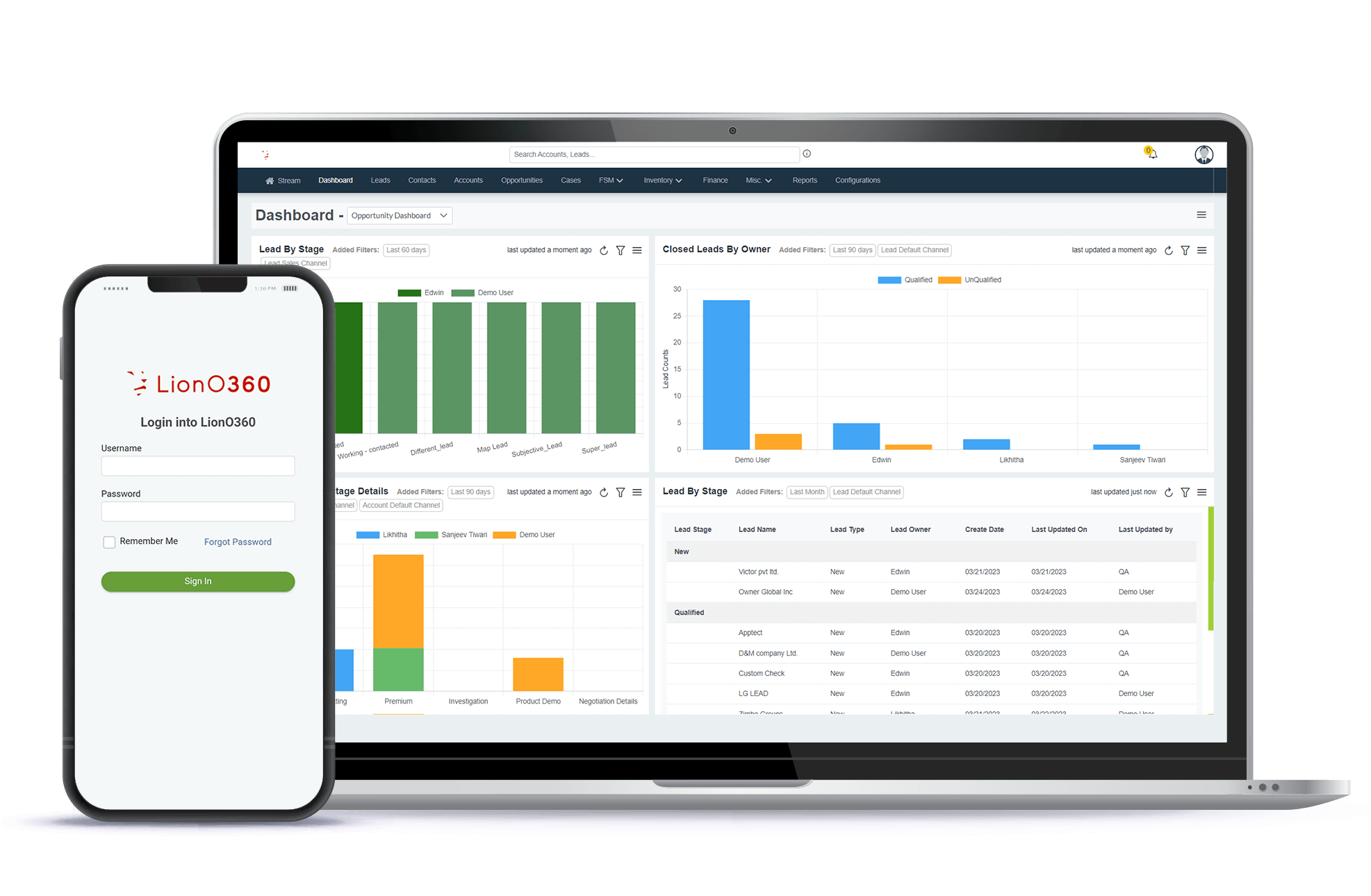
LionO360 CRM is built specifically to help you manage customer relationships better. It gives you all the tools you need to track customer information, communication history, and interaction patterns. With LionO360, you have a complete view of every customer relationship in one place.
Simple to Understand and Use
One thing that makes LionO360 CRM special is that it is easy to use. You do not need to be a technology expert. Your whole team can learn it quickly. When your team can use the system easily, they actually use it, and that is when you see real results.
Powerful Automation
LionO360 CRM lets you automate routine tasks. Send automatic emails. Schedule automatic reminders. Create automatic workflows. This saves your team time and makes sure nothing falls through the cracks.
Reports and Data
LionO360 CRM gives you clear, easy-to-understand reports about your customers. You can see trends, patterns, and insights that help you make better decisions about how to serve customers and keep them loyal.
Affordable Pricing
LionO360 CRM costs less than many other systems, but it does not cost less in features. You get a powerful system at a fair price. This makes it perfect for small to medium-sized businesses that want CRM power without breaking the budget.
Great Customer Support
When you choose LionO360 CRM, you are not just getting software. You get a team that cares about your success. Their customer support team is helpful and responsive. If you have questions or problems, they are there to help.
Proven Results
Thousands of businesses use LionO360 CRM to improve customer retention. They see higher repeat purchase rates. They see happier customers. They see stronger business growth. You can, too.
Integration with Your Existing Tools
LionO360 CRM works with the other software your business already uses. This means you do not have to change everything. Add LionO360 to your existing system.
Mobile Application
Your team can access LionO360 CRM from anywhere. On the road. In a meeting. At home. The mobile app works as well as the desktop version.
Secure and Reliable
Your customer data is important. LionO360 CRM keeps it safe with strong security. The system is reliable, and uptime is excellent.
Growing With Your Business
LionO360 CRM works for small businesses just starting out. But it also grows with you as your business gets bigger. You do not outgrow LionO360 CRM. It just gets better as you use more of its features.
Getting Started with LionO360 CRM

Ready to improve your customer retention with a good CRM customer management system? Here is how to get started with LionO360 CRM by LionOBytes:
Step 1: Start a Free Trial. Try LionO360 CRM free for 14 days. No credit card is needed. See how it works with your actual customers and data.
Step 2: Set Up Your customer document management. Import your existing customer information or start fresh. Customize your contacts the way you want them.
Step 3: Train Your Team spends time showing your team how to use LionO360 CRM. Most teams can learn the basics in just a few hours.
Step 4: Start Using It. Begin entering customer information and tracking interactions. Let the system help you do your work.
Step 5: Look at Your Results. After a few weeks, check your reports. Look at how your customer retention is improving. Adjust your approach based on what you learn.
Step 6: Grow Your Usage Once your team is comfortable with the basics, start using more advanced features. Set up automation. Use the mobile app. Try new reports.
Conclusion: Your Path to Better Customer Retention
Customer retention is one of the most important parts of building a successful business. Happy customers who buy again and again are the foundation of real growth. CRM customer management tools make it possible to know your customers better, serve them faster, and build relationships that last.
A good CRM relationship management system is not an expense. It is an investment in your future. When you invest in better customer management, you invest in business growth.
The LionO360 CRM is a powerful tool that can help you improve customer retention starting today. With its easy-to-use interface, powerful features, and affordable pricing, it is the right choice for businesses that want to grow by keeping customers happy.
The time to start is now. Your customers deserve to feel valued. Your business deserves to grow. LionO360 CRM makes both possible. Visit LionOBytes to learn more and start your free CRM demo today.
Frequently Asked Questions
What is the difference between CRM and customer management?
CRM stands for Customer Relationship Management. It is a software system. Customer management is the practice of managing relationships with your customers. CRM is the tool that helps you manage customer management better. CRM customer management happens when you use a CRM system to manage and improve your customer relationships actively.
How long does it take to see results from a CRM system?
The key is not to expect magic overnight. Give the system time and commitment. After six months, most companies see significant improvements in customer retention and satisfaction.
Is CRM only for big companies?
No. CRM is for any business that wants to serve customers better and keep them longer. Small businesses can use CRM just as well as big companies. In fact, CRM might help small businesses more because it lets them compete with bigger companies. When you know your customers as well as a big company knows its customers, you can compete. A good CRM makes this possible for small businesses.
What is the most important feature in a CRM for customer retention?
This depends on your business, but communication history is usually most important. When you and your team can see the complete history of every customer interaction, you can serve them better and avoid mistakes. The most important feature is the one that your team will actually use. Pick a CRM that your team likes and will use every day.